You're halfway through applying color and the phone rings. Peel off your gloves and answer, or let it ring out? Ignore it and you might lose a new client. Pick up and the client in your chair waits. If you run a salon on your own, this happens almost every day.
With staff, someone else handles the desk. In a one-person salon, cutting, coloring and answering booking requests are all your job. That's exactly why taking bookings works better when a system handles it instead of you.
This guide is for salons run by the owner alone, or with one assistant. It covers how to choose a salon booking system and how to run it so you can take bookings without stopping to answer the phone.
Three booking problems every solo salon knows
- You can't answer mid-service. Hands are full during shampoos and color. You mean to call back, then the next appointment starts and you forget.
- You miss bookings after hours. Clients think about booking in the evening after work or on their day off. With only phone and DMs, nobody catches those requests while the salon is closed.
- No-shows hurt more. In a one-person salon, an empty slot is that hour's income gone, and there's no other stylist to fill it.
What you want from a salon booking system is to shrink all three without you having to do anything.
Salon booking system: 6 things to check
1. Can clients finish booking on their phone alone?
Nearly all salon clients book from a phone. If they have to install an app or create an account first, some will give up. Open the booking page on your own phone and check that choosing a service, picking a time and entering contact details all happen right there.
2. Can you set a duration per service?
A cut takes 60 minutes, cut and color 120, a straightening treatment longer still. For a solo stylist it's essential that each service has its own duration and that open slots are calculated from it. If everything uses the same slot length, long services overlap, you run late and the next client waits.
3. Does it prevent double bookings?
Taking bookings by phone, DM and online at the same time makes it easy to put two clients in one slot. If online bookings fill the slot automatically and you can add phone bookings to the same schedule from your phone, double bookings stop.
4. Does it send automatic reminders?
An automatic reminder the day before cuts no-shows from clients who simply forgot. A solo stylist rarely has time to message every client the night before. Check that reminders go out on their own and how they're delivered (email, LINE).
5. Can one person run it comfortably?
Some booking systems are built for salon chains with dozens of staff. Shift planning and detailed sales analytics are nice, but in a one-person salon they're just more to set up. Something simple enough that you can enter your services and hours and start taking bookings is easier to stick with. We cover that angle in how to choose a simple booking system.
6. Can you start small (free plan, no card)?
Many owners want to see how many calls online booking actually saves before committing. Check whether there's a free plan and whether you can try it without a credit card. Pricing models vary widely, so check each vendor's official site for current terms. We compare tools you can start for free in free booking systems for small businesses.
How to take bookings without answering the phone
A booking system won't cut calls while clients still think calling is the way to book. What matters is making the booking page feel faster than the phone.
- Put your booking link everywhere clients look. Add it to your Instagram and Google Maps profiles, your website and your business cards. A line like "Book online 24/7" removes the reason to call.
- Suggest the next visit at checkout. "So about six weeks from now?" Book it before they leave. If they can't decide, just point them to the booking link.
- Point to the booking page in your voicemail and auto-replies. "I can't answer during appointments. Please book online." in your voicemail greeting and DM auto-reply keeps requests from slipping through.
- Start with a few services online. You don't need to publish everything on day one. Start with your most-booked services, like a cut or cut and color, and keep consultation-heavy services for direct messages.
Don't rely on booking portals alone
Many salons in Japan use portal sites such as Hot Pepper Beauty to find clients, and they remain a strong way to reach new people.
Portal booking pages also show nearby salons, though, so regulars can drift to a competitor. Fee structures differ by site and plan, so check each site's official information for details.
A realistic split for a solo salon is portals for new clients, your own booking page for regulars. Hand first-time clients your booking link at checkout, and they can book their next visits with you directly.
How to cut no-shows
Salon no-shows usually come from "I forgot" or "I couldn't make it but felt awkward getting in touch."
- Send a reminder the day before. Just reminding clients of the date prevents most of them.
- Show your cancellation rules on the booking page. Something like "Please let us know about changes by the day before" should be visible when they book.
- Make it easy to get in touch. Some people avoid calling. Accepting messages by DM or LINE turns a silent no-show into an advance cancellation, so you can refill the slot.
For more, see our guide to preventing no-shows.
Running a solo salon on BOOKIN
BOOKIN is a booking system built so small businesses can start taking online bookings quickly. For a one-person salon, it works like this:
- 24/7 online booking. Clients see open slots and book from their phone, even outside opening hours. No app to install.
- Durations per service. Set a duration for cuts, color, perms and so on; open slots are calculated automatically. Booked slots can't be selected again, so there's no double booking.
- Automatic reminders. A reminder goes out before each appointment to cut forgotten visits.
When clients open your booking page on their phone, they choose from services shown with photos and go straight to booking.
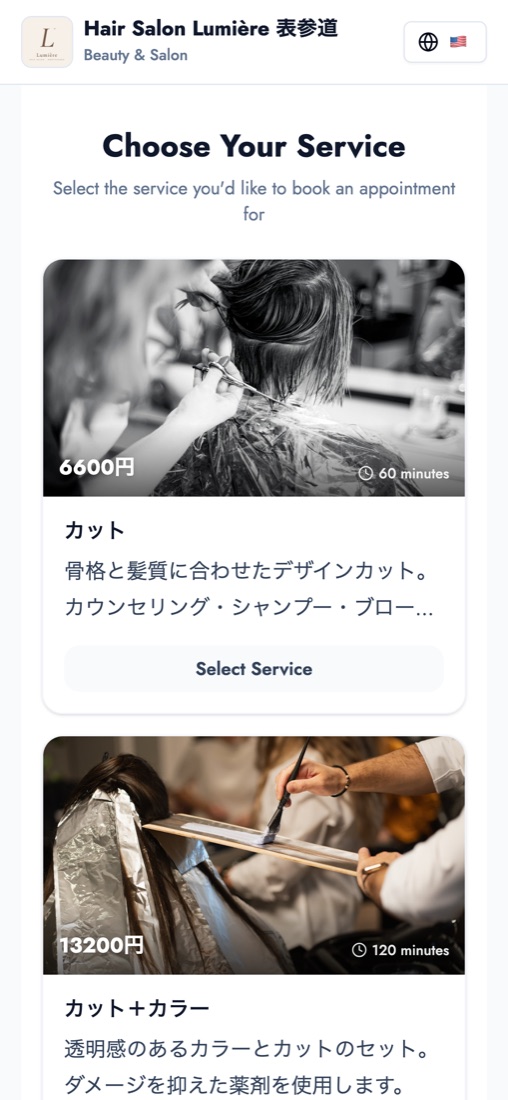
Demo salon photos: Gabriela / Unsplash, Ionela Mat / Unsplash
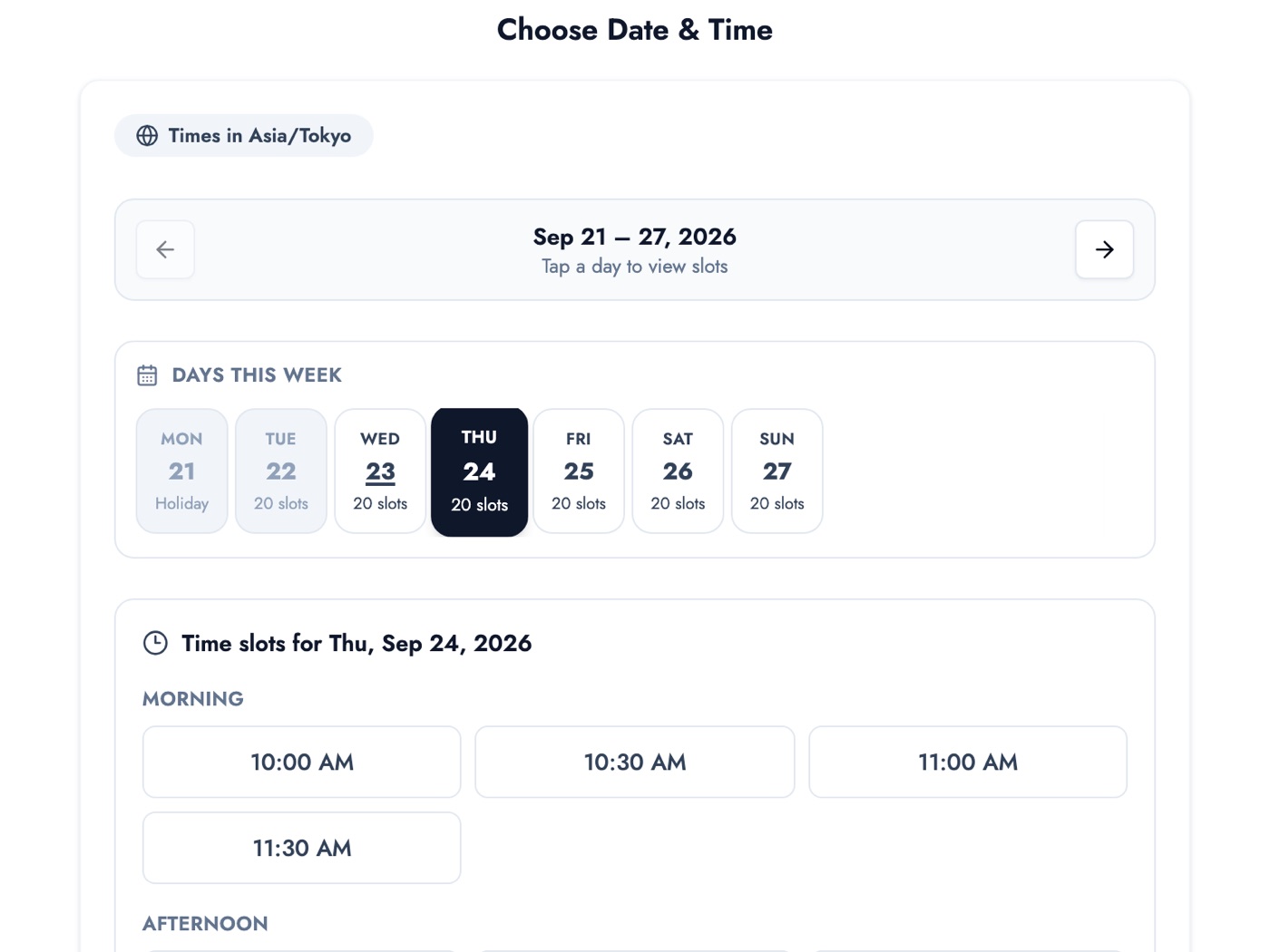
After picking a service, they only see the times still open that day. Bookings that come in while you're with a client are waiting in your bookings list afterwards.
You set each service's duration and price under Service Management.
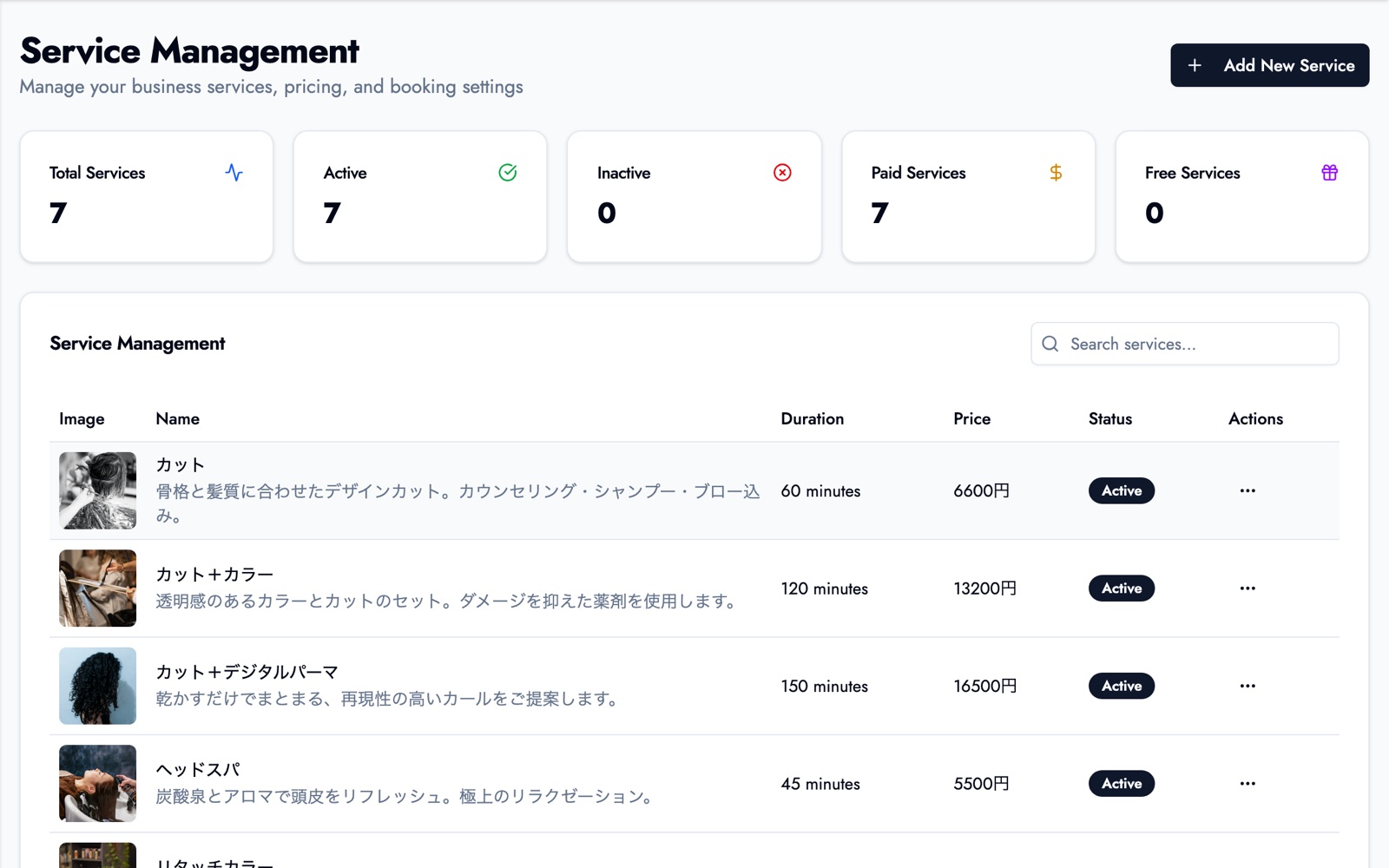
Demo salon photos: Gabriela / Unsplash, Ionela Mat / Unsplash, Ursula Castillo / Unsplash, QUENTIN Mahe / Unsplash
The free plan covers up to 50 bookings a month, up to 3 services and one team member, and clients can book up to 15 days ahead. No credit card required, so a good start is publishing just your three core services. Booking through LINE, a booking page QR code, per-client visit history and notes, booking a client's next visit from the dashboard (follow-up booking), multiple staff accounts and a longer booking window are on paid plans. See our salon booking system page for how it fits a salon.
Summary
- Solo salons mostly struggle with calls mid-service, missed after-hours requests and no-shows.
- Choose a salon booking system on phone-only booking, per-service durations, double-booking prevention, automatic reminders, simplicity for one person, and whether you can start small.
- To cut calls, share your booking link on social profiles, Google Maps, business cards and your voicemail.
- Use portals for new clients and your own booking page for regulars.
Start on the free plan with your three core services, then book yourself on your own phone the way a client would.
Take bookings online with BOOKIN. Set up in minutes, free plan available.
Start for free