"Before I pay for a booking system every month, can I just build a free one with Google?" It's one of the most common questions we get from people who've just opened a salon or run a studio on their own. Google Calendar and Google Forms are right there, and all you need is a Google account.
The short answer: yes, you can build a free booking system with Google tools alone. But once bookings pick up, the cracks show fast, from double bookings to sending every reminder by hand.
This guide walks through three ways to build a free booking system with Google, step by step, then looks at where each one breaks and when it's time to move to a dedicated booking system.
3 ways to build a free booking system with Google
There are three broad ways to take bookings with Google's tools.
| Method | Setup effort | Shows open slots | Prevents double bookings | Reminders before the visit | Best for |
|---|---|---|---|---|---|
| Google Calendar appointment schedules | Low | Yes | Checks against your calendar | Limited on the free tier | Solo owners with a few services |
| Google Forms + Calendar | Low | No (you add bookings by hand) | Manual check | Manual | Shops that need lots of details up front |
| Google Sheets + Apps Script | High | Depends on what you build | Depends on what you build | Depends on what you build | Someone on the team can code |
Google changes its products and what's included for free from time to time. This guide covers general usage, so check Google's official help pages for the latest details.
Method 1: Google Calendar appointment schedules
Google Calendar has a feature called appointment schedules that turns your free time into a public booking page. Of the three methods, it's the one that feels most like a real booking system.
How to set it up
- Open Google Calendar on a computer, click Create, and choose Appointment schedule
- Give it a title (for example, "Haircut, 60 min") and set the length of each appointment
- Choose which days and hours you take bookings
- Add buffer time between appointments and a daily booking limit if you need them
- Pick the fields customers fill in (name, email, phone number and so on) and save
- Paste the booking page link into your Instagram bio or your LINE greeting message
When customers open the link they see only your open times, and the slot they pick lands straight in your Google Calendar.
Things to watch out for
- A free Google account gets the basic features. Some features, such as email reminders before the appointment, are aimed at paid plans like Google Workspace.
- If your services have different lengths, you'll need one appointment schedule per service.
- With more than one staff member, each person ends up with their own booking page, so you have to tell customers which link to use.
Method 2: Take bookings with Google Forms
Here you build a booking request form in Google Forms, then add each request to Google Calendar yourself. We also cover linking a form from a LINE official account's rich menu in how to take LINE bookings for free.
How to set it up
- Create a new form in Google Forms
- Add questions such as name, phone number, service, first-choice date and time, and second-choice date and time
- In settings, turn on email collection and send respondents a copy of their answers
- In the Responses tab, turn on email notifications for new responses
- Share the form link on social media or LINE
- When a request comes in, check your availability, add it to Google Calendar, and message the customer to confirm
Things to watch out for
A form only collects requests. It doesn't show availability, so customers send a preferred time without knowing whether it's free, and nothing is confirmed until you reply. In effect, you've swapped phone call-backs for form call-backs.
Method 3: Build your own with Google Sheets and Apps Script
The third option is to use a Google Sheet as your booking ledger and connect it to Forms and Calendar with Google Apps Script. With enough work, you can manage open slots and send confirmation emails automatically.
The catch is that you need someone who can write and maintain the code. If that person leaves, or a change on Google's side breaks the script, nobody may be able to fix it. If you'd rather spend your time on your actual business, we don't recommend going down this road.
The limits of a free booking system built with Google
Every method works fine while bookings are few. The trouble usually starts in five places.
1. Double bookings happen
With a form, nothing stops two people from requesting the same time. With appointment schedules, forget to add a phone or walk-in booking to your calendar and that slot stays open online.
2. Reminders are manual
On the free tier, it's hard to set up an automatic "see you tomorrow" message. Sending them by hand stops being realistic once you have more than a few bookings a day. Reminders are the single most effective way to prevent no-shows, so doing them by hand makes no-shows harder to bring down.
3. Customers can't book directly in LINE
You can send a link over LINE, but you can't let customers book from your LINE official account and get confirmations and reminders there. For shops whose regulars mostly message them on LINE, that's a real gap.
4. More services and staff make it messy
Different service lengths, staff schedules, requests for a specific stylist: the more of these you have, the more schedules and forms you juggle, and the harder it gets to see what's booked where.
5. No customer history
Who has visited how many times, or which service they had last, means scrolling back through calendar events. If you want more repeat visits, that small hassle adds up.
When to switch to a dedicated booking system
If two or more of these apply to you, it's time to move off your homemade Google setup:
- You're getting more than 10 bookings a week
- You've had a double booking or a forgotten booking, even once
- No-shows or customers forgetting their appointment are a worry
- You offer three or more services, or have two or more staff
- You want to take bookings through LINE
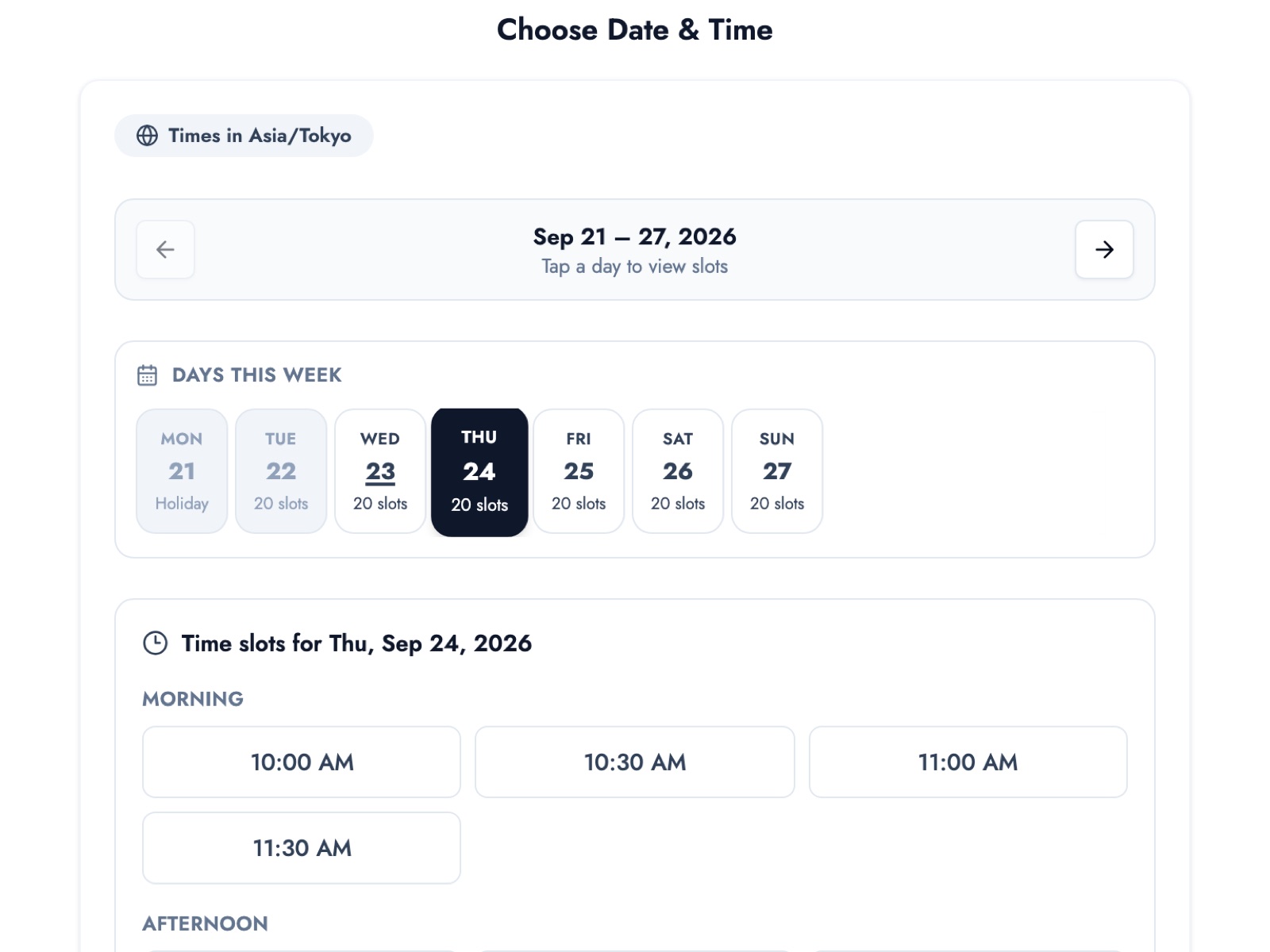
With a dedicated booking system, customers see only the slots that are open right now when they open your booking page. Once a slot is booked it's gone, so double bookings are prevented by design.
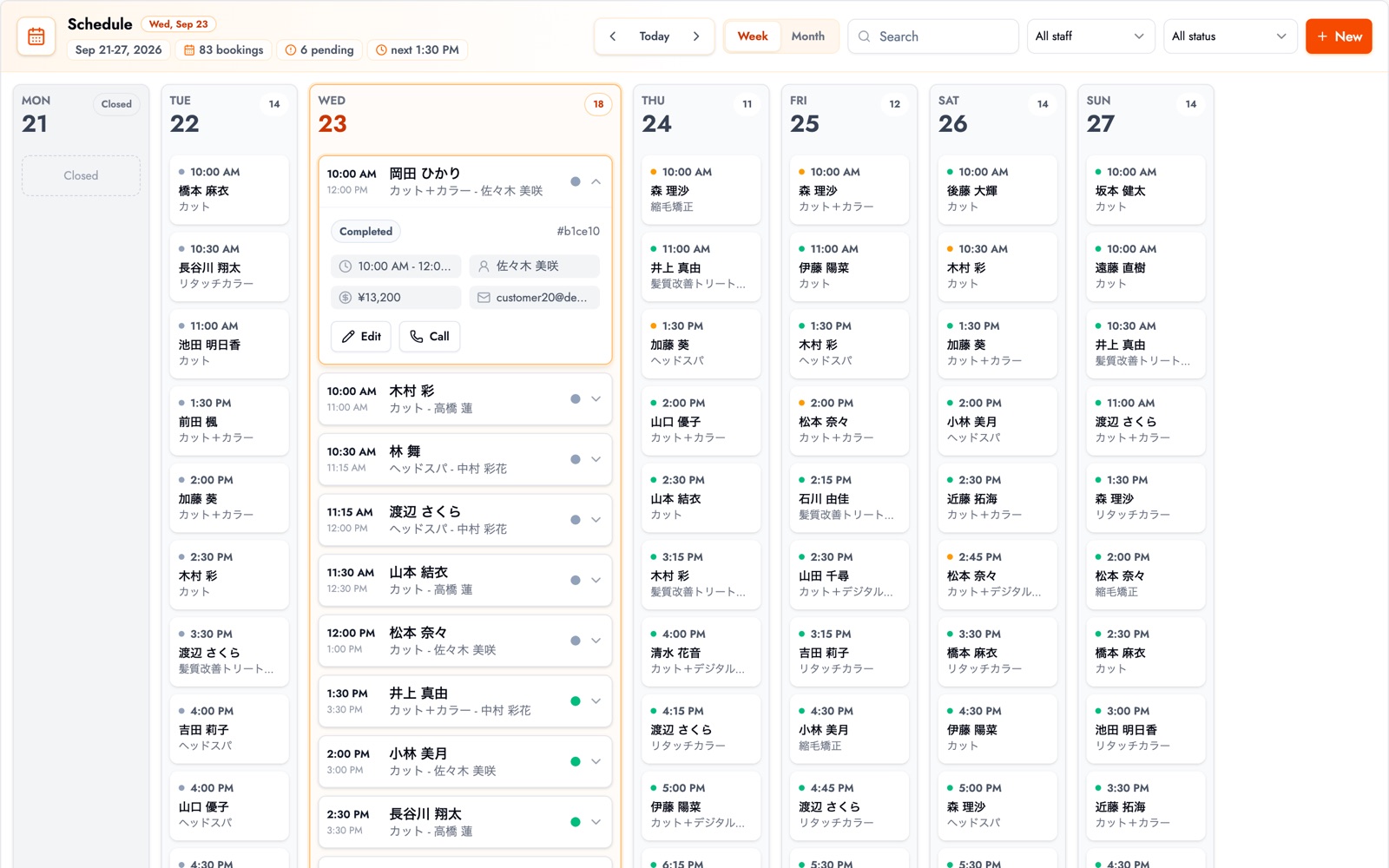
Bookings come together on one schedule, where you can see each staff member's week at a glance instead of comparing several calendars.
It's easy to assume a dedicated booking system means a monthly bill, but plenty of them have a free plan. BOOKIN's free plan includes your own booking page, automatic reminders before each visit, and booking management from your phone, with no credit card needed. Taking bookings through LINE, directly from your LINE official account, is a paid-plan feature. See what the free plan includes for details.
If you want to compare booking systems with free plans, our guide to 7 free booking systems lays out their limits and whether reminders are included.
Summary
- If you want to build a free booking system with Google, Google Calendar appointment schedules are the easiest place to start
- Google Forms only collects requests; checking availability and confirming are up to you
- The limits come down to five things: double bookings, reminders, LINE, managing services and staff, and customer history
- Once you pass about 10 bookings a week or have your first double booking, look at a dedicated booking system with a free plan
If your Google booking page has shown you that customers will happily book online, that's a big step. The next one is moving those bookings onto something that runs itself, so you spend less time on the phone and on admin.
Take bookings online with BOOKIN. Set up in minutes, free plan available.
Start for free